
1. Overview
1.1. Introduction
This document describes the installation, usage and functionality of a TLM (TOPDOC Loadable Module) for SoftPLC versions 4.6 and later. This TLM implements the master side of the Modbus Master/Slave Protocol using a serial line. See here and here for definitions of this protocol.
The TLM described by this document is called MODBMAST. This software capability is implemented as a TOPDOC Loadable Module (TLM), written in C++ and implements a fairly comprehensive driver which can manage up to 247 slaves on each of up to 32 serial ports.
This TLM may be used to monitor and control serial RS485, RS422, or RS232 attached slaves. Modbus protocol has been used as the basis of SCADA systems, but was originally designed for communicating with Modicon PLC’s. This TLM has features in it that allow it to also do a reasonable job controlling I/O. That is, it can be configured to take special steps to drive outputs in a way consistent with programmable controller outputs, such as turning outputs off when transitioning to a program/stopped from a run mode. Both Modbus RTU and Modbus ASCII are supported, however Modbus ASCII support requires SoftPLC version 4.6.160608 and TOPDOC NexGen version 1.6.160608 or later.
SoftPLC offers other TLMs in support of Modbus TCP/UDP, as well as Modbus RTU/ASCII Slave. This TLM only implements the serial line form of the protocol and only the master side of it.
| Media Type | Master | Slave |
|---|---|---|
Serial Line |
*this TLM* |
|
TCP and UDP |
TLMs may be developed by any competent C/C++ programmer who has access to the SoftPLC C/C++ Programmer’s Toolkit, a product readily available from SoftPLC Corporation. There are a number of Systems Integrators who are SoftPLC Partners who possess the requisite expertise. End users may also have this capability.
1.2. Definitions
-
Modbus RTU and ASCII protocols are Modbus serial protocols. They support up to 247 slaves on any party-line type bus such as RS485, RS422, or radio packet network.
-
A Modbus transaction is master - slave in nature, and consists of the master node sending a request and the slave node replying to the request with a response. The master node always sends the request and the slave node always sends the response. The slave node only speaks when spoken to with a request. Each request is owed exactly one response.
-
A Modbus query is another name for request.
-
Within a request is a Modbus function code, which is the byte which actually determines the purpose of the request.
1.3. Concepts
The SoftPLC runtime engine software supports TLMs, which are shared library extensions to SoftPLC. A TLM may be loaded either as a DRIVER or as a MODULE. The difference between a DRIVER and a MODULE is that a DRIVER is called once per SoftPLC scan, and optionally an additional number of times per scan. A MODULE is only called when the control program decides to call it and not as an inherent part of the scan. TLMs are made known to SoftPLC in the MODULES.LST file which may be edited by TOPDOC NexGen by traversing to: PLC | Modules.
1.4. Features
1.4.1. Serial Ports and Slaves
To use the Modbus Master you need one or more Modbus serial slaves and one or more compatible serial ports on your SoftPLC master machine. (SoftPLC Corporation can provide master machines with many serial ports.) Up to 32 serial ports can be configured and are supported by the software. On each port there can be up to 247 slaves.
1.4.2. Optional Hardware Handshaking
As a configuration option, the TLM can manipulate the RTS (request to send) serial port signal line, and watch for the CTS (clear to send) line. This can be useful to drive a radio packet modem, by using RTS to fire up a radio transmitter. The RTS line will be asserted just before it is time to send, and the CTS line can be a condition of sending. This is optional on a per port basis, and with port specific timing adjustments.
1.4.3. Request Specific Cycle Time
Each request may have its own timeout and retry count. Each request can be given its own cyclical period of repetition, or may run on the basis of "as fast as possible". Generally, all the requests on a port are handled on a round robin basis, but the requests configured with a specific cycle time can modify this behavior within reason.
1.4.4. Configuration File Supports Inheritance
The configuration file uses XML, and a dedicated configuration editor is provided to make the entry of requests user friendly. The nature of the XML attributes used makes it possible for an XML element to inherit a value from its parent/container XML element if not explicitly provided at nested element level.
1.4.5. Requests Operate Using Scatter/Gather
When declaring a request in the configuration file, the master’s source datatable does not need to be contiguous for any single Modbus write, nor does the master’s destination datatable for any single Modbus read. That is, a single read may put the results obtained from a single read into various places within the datatable. And the datatable values used in a single write do not have to come from a single block within the master’s datatable.
1.4.6. Slave Specific Error Reporting
The driver includes some ladder instructions which manage slave specific error and reporting status, and are used to troubleshoot a Modbus network and track down problematic slaves.
1.4.7. Massive Datatable
SoftPLC controllers have access to massive amounts of datatable and this makes it possible to use this TLM to manage large multi-bus SCADA systems. The SoftPLC master can be a data concentrator of the highest class.
1.4.8. No Extensive Programming
This TLM can be used without extensive application program logic. Only a few rungs are needed to retrieve slave status blocks. This makes it easy to deploy.
Each request can be earmarked with one of three "when" attribute values as a means of determining when the request may be sent.
| When | Description |
|---|---|
start |
These are messages which are sent only once to a slave upon a transition of the SoftPLC master to a RUN mode, and can be used as single shot configuration data. |
run |
These are continuous scan type messages issued when the SoftPLC master is in a RUN mode. Messages of this kind can also have a cyclical periodic rate defined, or can run as fast as possible. |
stop |
These are single shot requests issued once when the master transitions to a PROGRAM (stopped) mode. |
SoftPLC also provides a Modbus RTU/ASCII Slave TLM, which is documented here. A single SoftPLC machine can be both a master and a slave. This capability gives systems designer the power and flexibility to develop very powerful, fast and flexible distributed control systems. Obviously a SoftPLC Modbus master can talk to a SoftPLC Modbus slave as well as third party slaves.
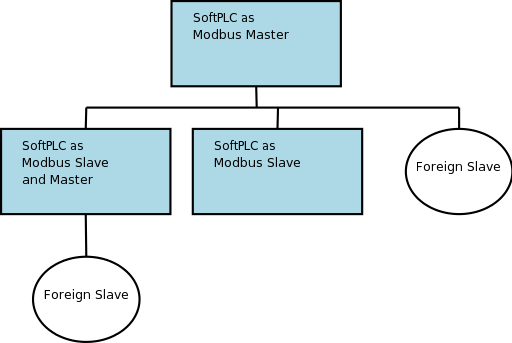
The following is a list of common Modbus functions and whether they are supported by this TLM or not:
| Modbus Function | Name | Supported |
|---|---|---|
1 |
Read Coils |
Yes |
2 |
Read Input Discretes |
Yes |
3 |
Read Multiple Registers |
Yes |
4 |
Read Input Registers |
Yes |
5 |
Write Coil |
Yes |
6 |
Write Single Register |
Yes |
7 |
Read Exception Status |
No |
15 |
Force Multiple Coils |
Yes |
16 |
Write Multiple Registers |
Yes |
20 |
Read General References |
No |
21 |
Write General Registers |
No |
22 |
Mask Write Register |
Yes |
23 |
Read Write Registers |
Yes |
24 |
Read FIFO Queue |
No |
2. Terms of Use
Because of the variety of uses of the information described in this manual, the users of, and those responsible for applying this information must satisfy themselves as to the acceptability of each application and use of the information. In no event will SoftPLC Corporation be responsible or liable for its use, nor for any infringements of patents or other rights of third parties which may result from its use.
SOFTPLC CORPORATION MAKES NO REPRESENTATIONS OR WARRANTIES WITH RESPECT TO THE CONTENTS HEREOF AND SPECIFICALLY DISCLAIMS ANY IMPLIED WARRANTIES OF MERCHANTABILITY OR FITNESS FOR ANY PARTICULAR PURPOSE.
SoftPLC Corporation reserves the right to change product specifications at any time without notice. No part of this document may be reproduced by any means, nor translated, nor transmitted to any magnetic medium without the written consent of SoftPLC Corporation.
SoftPLC and TOPDOC are registered trademarks of SoftPLC Corporation.
© Copyright 2010-2016 SoftPLC Corporation ALL RIGHTS RESERVED
| First Printing |
July, 2010 |
| Latest Printing |
June, 2016 |
SoftPLC Corporation
25603 Red Brangus Drive
Spicewood, Texas 78669
Telephone: 512-264-8390 or 800-SoftPLC (USA)
Fax: 512/264-8399
URL: http://softplc.com
Email: support@softplc.com
3. Scanning Operation
3.1. Operating Modes and States
The SoftPLC runtime engine is always in one of the following states, called Operating Modes.
| Mode | Description |
|---|---|
Program or Remote Program |
Logic is not being solved and the outputs are in an idle state. Normally idle state means "turned off or zeroed". |
Run or Remote Run |
Logic is being solved and the outputs are active and under the control of the logic program. They are not idle. The logic program makes its decisions based on the current state of each input, all of which are actively scanned. |
Test or Remote Test |
Logic is being solved but the outputs are idle. The logic program makes its decisions based on the current state of each input, all of which are actively scanned. |
Faulted |
Logic is not being solved and the outputs are idle. This mode is entered automatically if you have an error in your program or in one of your driver configurations. |
Each configured Modbus slave is always in one of the following states. Each slave’s state is independent of the state of any other slave, so not all slaves are always in the same state.
| State of Slave | Description |
|---|---|
Present and Responding |
The TLM has a good connection to the slave and knows that it is responding within a timeout limit to its requests. A subset of this state is the situation where the slave responds with an Modbus exception to a request. |
Not Present or Not Responding |
The TLM is not able to get any response to its requests from this slave. This is the case when the cable is disconnected, the slave is not powered up, or the slave has failed. |
The two states shown are tracked by the MODBMAST.TLM for each slave. The Present and Responding state is used for all 4 Operating Modes. As long as a slave is responding, the TLM can tell it what to do and thereby honor its obligations with respect to Operating Modes. The slaves have no actual knowledge of the SoftPLC Operating Modes per se. A slave can however be told to turn its "outputs" off by sending zeroes to those Modbus memory registors in the slave. The slave does not know the data is "idle" data, only the TLM does.
3.2. Driver State Transitions
The SoftPLC runtime engine notifies all TLMs of the need to change from one Operating Mode to another. A TLM that is acting as an I/O driver must honor the behavior outlined in the Operating Modes table above. To accomplish this, there are responsibilities that must be met at the edge of these mode transitions.
Some slaves may need to be configured, and maybe the configuration can be done using one or more Modbus requests on a single shot basis. This soft configuration is supported by the TLM when entering Run mode.
| Object | Transition | Description |
|---|---|---|
Runtime Engine |
From Test, Program, or Faulted to Run Mode |
The TLM issues the when="start" requests on a one shot basis. |
Runtime Engine |
From Run Mode to Program or Faulted |
The TLM issues the when="stop" requests on a one shot basis. |
3.3. Scan is Asynchronous
At any moment in time, there is a scan list within the TLM for each port. The scan list is a list of requests that need to be sent now or sometime in the future. The front or top of the list holds the request currently being processed on that port. When completed or timed out, that request is moved towards the rear of the list for another attempt later. Because serial communications can be slow, depending on baudrate, number of slaves, and the turn around time at each slave, this TLM was designed to allow the scanning of the entire scan list to complete over several program scans. And since each port has its own scan list, and the size of these can be different, the total time to scan the entire scan list (scan time) will be different for each port.
| Unlike other SoftPLC TLMs, this one modifies datatable memory during the program scan. Most other TLMs wait until the end of program before they modify datatable. |
When you set the "attempts" attribute to greater than its default of one, then that request will immediately be tried again at that point in the scan list should there be a reply timeout. The "attempts" setting only pertains if there is a timeout. If "attempts" is left at the default of one, then the failed request will be put at the end of the scan list and will be attempted later once it works its way again to the front of the scan list. There is currently no way to take a slave out of the scan list except through a configuration file change. But leaving "attempts" set to one means that a temporarily unavailable slave will only be sent a request once, but once for each request configured for that slave and there may be several.
3.4. Using Short requestTimeouts
The master begins timing a transaction only after the entire request has been transmitted. This makes the requestTimeout independent of request length. If the first byte of the reply is not seen within requestTimeout msecs from this point, then the transaction is deemed timed out. After the first byte of the reply is received, then a different type of timeout comes into play, and that is the inter-character timeout limit which comes from the Modbus specification. So the requestTimeout is also independent of reply length. Essentially this means that the requestTimeout can be thought of as mostly corresponding to the turn around time of the slave, and has only minimal dependency on the baudrate of the reply. Therefore, it is possible to have fairly agressive and tight requestTimeouts. This makes it possible to minimize the impact on overall scan time of a missing slave.
4. Configuration
4.1. Modbus Fields
Modbus protocol transactions were originally designed for communicating with Modicon PLC slaves. They assume the existence of and reference four different types of Modicon device memory regions. Any non-Modicon slave must emulate these four memory regions as if it were an actual Modicon PLC. Words and bits within these memory addresses are addressed using Reference Numbers, according to the following table.
The first character of a reference number identifies which of the four memory regions is being addressed within a (ficticious) Modicon PLC. The first character is special, and might as well be conceptually removed from the reference number before interpreting the remaining portion of the reference number itself. So when you see a reference number like 40001, think of this as section 4, and element 0001. Section 4 is for Output (aka Holding) Registers. After the leading character you are then left with ordinal 0001 or 1. The elements within each of the 4 Modicon memory regions are numbered starting from 1.
| Memory Region | Id Number | Example |
|---|---|---|
Input Discrete (boolean inputs) |
1 |
e.g. 120438 |
Input Registers (16 bit words) |
3 |
e.g. 3023 |
Output Coils (boolean outputs) |
0 |
e.g. 0438 |
Output (aka Holding) Registers (16 bit words) |
4 |
e.g. 40438 |
4.2. Elements
This TLM is configured using a special configuration editor which is built into TOPDOC NexGen. The configuration file is XML text, is hierarchical with the following XML elements. Elements are listed below with one of the following characters appended. The appendage is used to indicate how many times the element may occur in any given context.
The appended character and its meaning is as follows:
-
Question Mark (?) ⇒ Optional (zero or one)
-
Asterisk (*) ⇒ Zero or more
-
Plus Sign (+) ⇒ One or more
-
None (no suffix) ⇒ exactly one
| Element Name | Description | Sub Element(s) |
|---|---|---|
ModbusSerial |
Top most element, holds all other elements |
Port* |
Port |
References and configures a serial COM port on the master. |
ModemControl?, Slave* |
ModemControl |
Its presence turns on hardware handshaking for the enclosing port. |
|
Slave |
Declares and holds transactions for a slave on the enclosing port. |
ReadInputDiscretes*, ReadInputRegisters*, ReadMultipleRegisters*, ReadCoils*, WriteSingleRegister*, WriteMultipleRegisters*, MaskWriteRegister*, ForceMultipleCoils*, WriteCoil*, ReadWriteRegisters* |
ReadInputDiscretes |
A Modbus request of the same name |
refNum, toBlock |
ReadInputRegisters |
A Modbus request of the same name |
refNum, toBlock+ |
ReadMultipleRegisters |
A Modbus request of the same name |
refNum, toBlock+ |
ReadCoils |
A Modbus request of the same name |
refNum, toBlock |
WriteSingleRegister |
A Modbus request of the same name |
refNum, fromBlock |
WriteMultipleRegisters |
A Modbus request of the same name |
refNum, fromBlock+ |
MaskWriteRegister |
A Modbus request of the same name. The "or mask" comes from the value of the fromBlock |
refNum, andMask, fromBlock |
ForceMultipleCoils |
A Modbus request of the same name |
refNum, fromBlock |
WriteCoil |
A Modbus request of the same name |
refNum, fromBlock |
ReadWriteRegisters |
A Modbus request of the same name |
refNum, toBlock+, refNum, fromBlock+ |
refNum |
A Modicon reference number |
|
toBlock |
Where the reply data is to be written into SoftPLC |
|
fromBlock |
Where the request data is read from SoftPLC |
const? |
andMask |
An integer constant, like 0xFFFE. See the Modbus specification for the MaskWriteRegister request. The orMask is given by the fromBlock for this request, and unlike the and mask, does not have to be constant. |
|
const |
A list of integer constants. These data will be sent as part of the enclosing request, in lieu of reading live data from the SoftPLC master’s datatable. A "const" is an optional way to customize a fromBlock. |
| When using TOPDOC NexGen to edit the configuration file, its application specific editor takes care of enforcing the rules of the configuration file. |
| Notice that a few of the word oriented requests can take multiple fromBlocks and/or multiple toBlocks. In the case of read word requests, the multiple toBlocks are used to split up the response into several SoftPLC memory locations. So you can route your discrete input data into the INPUT datatable section and your analog data into an INTEGER datatable section, should they need to be in the same response. Each toBlock "consumes" some of the response data consecutively, according to its count field. So the sum of all the count fields should not exceed the allowed limit for the request’s response. Likewise, for word write requests, multiple fromBlocks are supported. This allows you to assemble a request using data from multiple sources within SoftPLC. Your discrete output data can come from the OUTPUT datatable section and your analog data can come from an INTEGER datatable section, and be part of the same request. Again, the sum of the count fields for the fromBlocks cannot exceed the limit for the request. Input data that you put into the INPUT datatable section with a toBlock will automatically feature the Input Forcing cabability within the SoftPLC runtime. Output data you get from the OUTPUT datatable section using a fromBlock will automatically feature the Output Forcing capability within the SoftPLC runtime. Only those two sections support forcing, a feature which is mostly helpful for discrete I/O, and not usually analog data. |
The following is a sample screen from the configuration editor showing a few of the elements from the above table. Notice how they are arranged hierarchically and that each element can "contain" other elements. (The rules of containment are given in the table Elements and their Allowed Sub-Elements.)
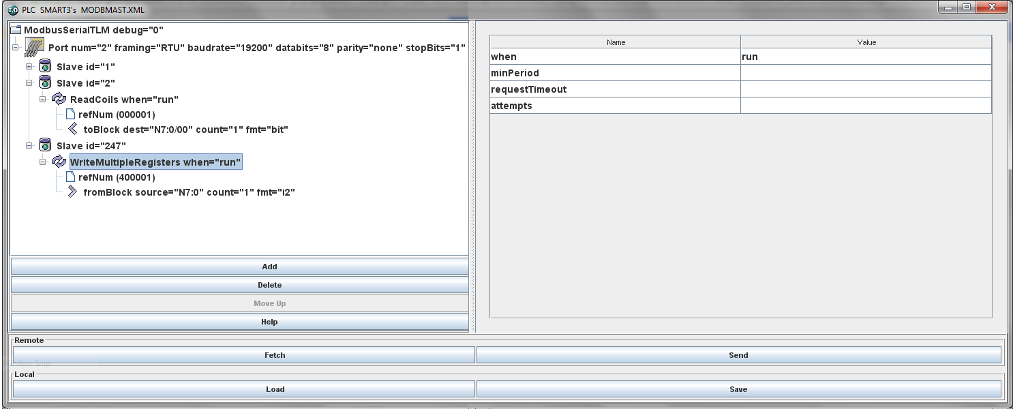
In the above panel, the element name is at the far left of each tree row. To the right of the element name, still within the tree row, is a list of attributes. That element’s attributes are elaborated on within the table at the far right of the panel. That table is dynamic (depends on the selected element), and has one row for each attribute. The following table lists the allowed attributes for each element type:
4.3. Attributes of Elements
In the rules table which follows you will see three attributes occur in more than one XML Element (tree node). The three attributes are:
-
minPeriod
-
requestTimeout
-
attempts
These three are special and are the inherited attributes . If missing at a given node, then the value is used from the next nearest ancestor above which encloses the node missing the attribute. For example, if a request node does not have a requestTimeout setting (because it is optional and in this example is not present) then the enclosing Slave element is searched for a requestTimeout. If it is still missing there, then the enclosing Port element is searched. If it is still missing there, then the Port’s default is used.
The table below gives the allowed attributes which may be attached to each XML element in the configuration file. Only these attributes may be attached to the corresponding element.
| Element | Attribute | Value | Required |
|---|---|---|---|
ModbusSerial |
debug |
0, 1, or 2, meaning "enable none, some, or all debugging print statements" |
no, defaults to 0 |
Port |
num |
The COM port number, 0 - 31. "num" must be unique for all ports, and must be supported by physical hardware on your SoftPLC runtime machine. |
yes |
framing |
Type of encoding used in Modbus Serial frames, RTU or ASCII. |
yes, defaults to "RTU" |
|
baudrate |
The bit rate of the COM port. 300 - 230400 |
yes, use 19200 if in doubt |
|
dataBits |
The number of databits to use. Use 8 for RTU, 7 or 8 for ASCII. |
no, defaults to 8 |
|
parity |
The parity setting, may be "none", "even", "odd", or "mark" |
no, defaults to "none" |
|
stopBits |
The stopbits setting, may be 1 or 2. |
no, defaults to 1 |
|
minPeriod |
The minimum number of milliseconds to wait between attempts to send a request. |
no, defaults to 0 |
|
requestTimeout |
Milliseconds to wait for a response to a request, for any request contained by this element. |
no, defaults to 30 |
|
attempts |
The number of times a request is sent without receiving any reply within requestTimeout msecs before it is deemed failed and put at the end of the scan list. |
no, defaults to 1 |
|
requestGap |
Milliseconds to wait after receiving a reply before sending the next request |
no, defaults to 3, range 0-250 |
|
ModemControl |
waitDelayCTS |
The number of msecs to wait for the CTS line to be asserted by the modem, indicating that it is ready to handle a transmission of a request. |
yes |
Slave |
id |
Provides the slave identification number, 1 - 247. Must be unique within an enclosing port. |
yes |
minPeriod |
The minimum number of milliseconds to wait between attempts to send a request. |
no, defaults to Port’s |
|
requestTimeout |
Milliseconds to wait for a response to a request, for any request contained by this element. |
no, defaults to Port’s |
|
attempts |
The number of times a request is sent without receiving any reply within requestTimeout msecs before it is deemed failed and put at the end of the scan list. |
no, defaults to Port’s |
|
<any request> |
when |
"run" or "start": run ⇒ when in a run mode, start ⇒ one shotted when entering a run mode |
no, defaults to "run" |
minPeriod |
The minimum number of milliseconds to wait between attempts to send a request. |
no, defaults to Slave’s |
|
requestTimeout |
Milliseconds to wait for a response to a request. |
no, defaults to Slave’s |
|
attempts |
The number of times a request is sent without receiving any reply within requestTimeout msecs before it is deemed failed and put at the end of the scan list. |
no, defaults to Slave’s |
|
refNum |
|||
toBlock |
dest |
a SoftPLC word or bit address, e.g. "I12:0". If the enclosing request reads registers (not coils or discretes), then a word address is required. If instead the enclosing request reads coils or discretes, then a bit address may be supplied but its bit component must be zero. |
yes |
count |
the number of 16 bit words or the number of bits, depending on the enclosing request and the fmt attribute of this toBlock. |
yes |
|
fmt |
format of the response data, and determines the interpretation of the count attribute. "i2" or "bit": i2 ⇒ 16 bit (2 byte) signed integers, bit ⇒ bits |
yes |
|
fromBlock |
source |
a SoftPLC word or bit address, e.g. "O12:0". If the enclosing request writes registers (not coils or discretes), then a word address is required. If instead the enclosing request writes coils or discretes, then a bit address may be supplied and its bit component may be non-zero. |
yes |
count |
the number of 16 bit words or the number of bits, depending on the enclosing request and the fmt attribute of this toBlock. |
yes |
|
fmt |
format of the response data, and determines the interpretation of the count attribute. "i2" or "bit": i2 ⇒ 16 bit (2 byte) signed integers, bit ⇒ bits |
yes |
|
andMask |
| In most cases where an "integer constant" is allowed, for example in the andMask or const elements, you may enter that value in either hex or decimal. Hex numbers start with a leading "0x". Example: "16" or "0x0010" would be OK. |
5. Usage
5.1. Installation
The TLM is named modbmast.tlm.so and is found as part of the standard SoftPLC 4.x installation in the /SoftPLC/tlm directory. To use it you merely have to enable it in NexGen’s PLC | MODULES editor. Then you must edit the xml file MODBUS.XML which is the TLM’s configuration file. There is an application specific editor for this MODBUS.XML file within NexGen. It is easy to edit the configuration file from the PLC | MODULES editor. Simply click on the Configure button after selecting and enabling Use in the same row as the MBIPMAST TLM.
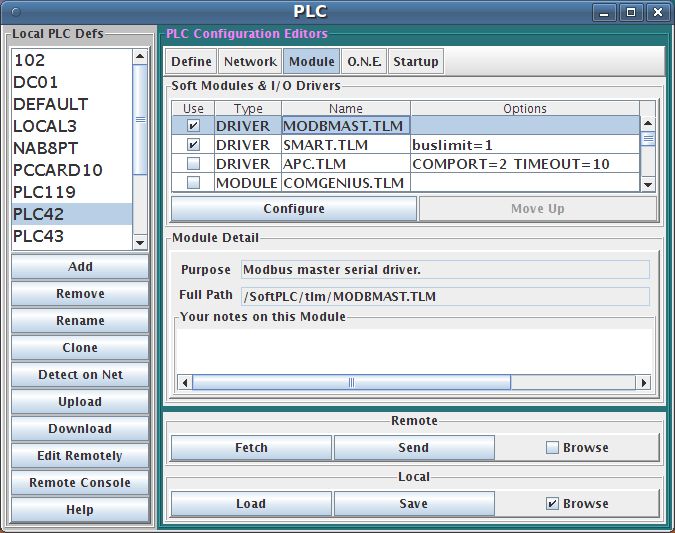
5.2. Editor Usage
Add button will insert a new element within the selected element. First select the element you wish to insert into.
Delete button will deleted the selected element. It is only enabled when you are allowed to delete the selected element.
Move Up button will move the selected element up in the current containment list.
Fetch, Send, Load, and Save all have the same meaning as they do in the NexGen Module editor. You can see the helpfile for that editor by going to that editor and clicking on Help.
Use Send to transfer the configuration down to the SoftPLC. The next step is to cycle power on the SoftPLC for the changes to take place.
| As an alternative to cycling power, you may enter "Remote Program" mode using NexGen, then select "Remote Program" a second time. This psuedo transition from Remote Program to Remote Program is a signal to the TLM that it should reload its configuration file. This way you can reconfigure without cycling power, although it does require you enter "Remote Program" mode (twice!). |
5.2.1. Configuring a Port
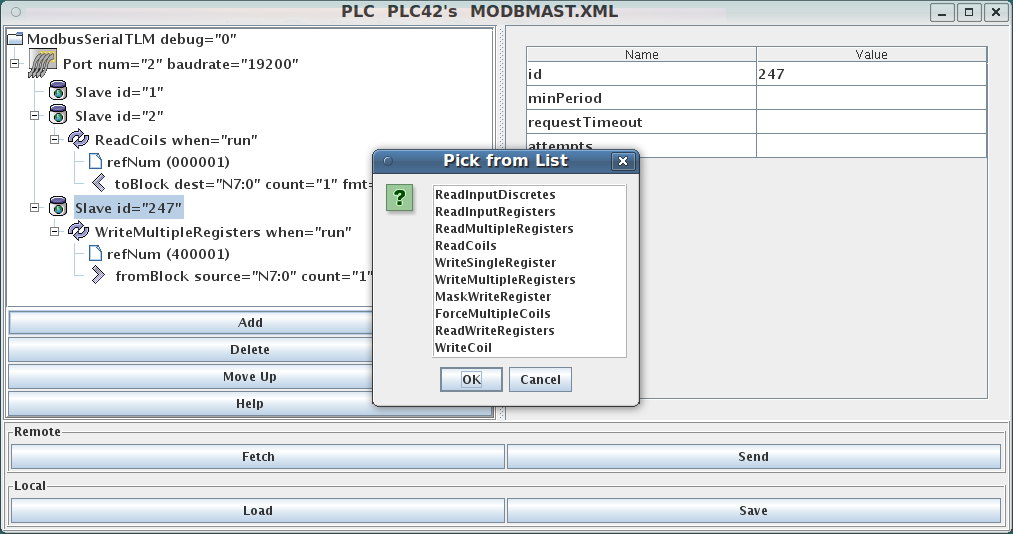
A Port is configured simply by adding the desired Slave elements and Modbus requests to the Slave. Clicking the Add button with a Slave selected will bring up a list of requests to choose from as shown in the image above. The request must then be manually configured by setting the refNum and the attributes of the toBlock or fromBlock.
5.3. Ladder Instructions
This TLM implements three ladder instructions which are useful for diagnostics and fault situations.
5.3.1. MBR_GETFAULTMAP
This ladder instruction can be used to fetch a bitmap of up to 247 slaves on a given port. The bitmap is copied into the Map: instruction parameter which is a block of 17 words. If any slave is in the Not Present or Not Responding state, then its corresponding bit will be set, else not.
| Parameter | Meaning |
|---|---|
Port: |
The COM port number of interest. |
Map: |
A block address of 17 words (= 247/16, rounded up) which will receive a bitmap of all the configured slaves on the requested port. (By using a block + address in a 'B' datatable file, the bit numbers will ascend from zero across word boundaries.) The bit numbers will then correspond to slave id. Bit 0 will not be used since there can be no slave 0, and this bit will always be set to zero. |
This is a permissive instruction and it will evaulate to false when all the bits in the Map are zero, meaning no slave faults. If any slave is in the Not Present or Not Responding state, then its corresponding bit will be set in the Map and the instruction will evaluate to true. In the example which follows, a counter is incremented to keep track of the number of times any slave has not responded. If you don’t want the counter to increment on every program scan, but rather only on low to high transitions, then remove the unlatch instruction from the example rung below.
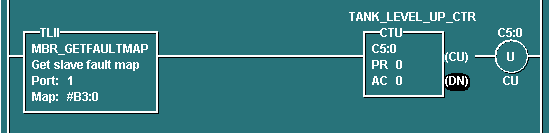
For example, if block #B3:0 were used to receive the Map , then testing B3/123 would tell you if slave 123 was failed. You could test this bit with XIC to increment a dedicated counter (CTU) to track failures of this specific slave.
5.3.2. MBR_GETSTATUS
This instruction can be used to fetch 5 status words for each slave. The TLM keeps a 5 word status block for each slave internally. This 5 word block can be retrieved into the datatable for any slave.
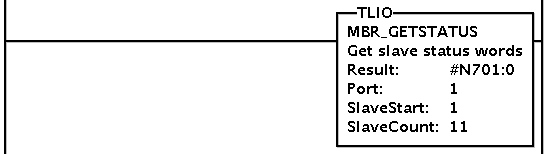
| Parameter | Meaning |
|---|---|
Result: |
A block address which will receive a number of 5 word status blocks, depending on how many Slaves are requested in SlaveCount. The pattern of 5 words is repeated one after another according to the Five Word Slave Status Block definition below. |
Port: |
The COM port number of interest. |
SlaveStart: |
The slave id of the first Slave of interest within a contiguous sequence of slave ids. These Slaves should be defined in the configuration file under Port. |
SlaveCount: |
The number of Slaves of interest starting at the Slave with slave id equal to SlaveStart. In the example rung above, there will be 11 Slaves fetched starting at slave id 1, and these would be 1,2,3,4,5,6,7,8,9,10, and 11. |
The meaning of the 5 status words is as follows: (Meanings are for a single specific slave)
| Word Index | Status Counter Meaning |
|---|---|
0 |
Average response time in msecs. This time is measured from just after the request has been transmitted onto the wire to just after the reply has been receieved, and so is dependent on baudrate of the reply and turnaround time of the slave. It is a floating average of recent transactions for this slave. |
1 |
Number of times there was no reply at all within requestTimeout msecs, or there was an inter character timeout within the reply. (Wraps around and may appear to be negative as it goes above 32,767.) |
2 |
Number of times TLM saw a Modbus exception response from the slave. (Wraps around and may appear to be negative as it goes above 32,767.) |
3 |
Set to the Modbus function code of any request that has most recently failed. Will be set to zero upon the next successful completion of any request. So it must be snapshotted since it goes to zero quickly after a failure. A non-zero value in here means the slave had some kind of problem very recently, and the value in here tells you the Modbus function code of the failed request. |
4 |
Is one of 3 types of values: |
Notice that the two counters, at index 1 and 2, will overflow into a negative range after awhile and eventually wrap around through zero.
This instruction can be used to monitor the configuration correctness, health, performance, and connection integrity of any or all slaves.
5.3.3. MBR_CLEARSTATUS
This instruction clears the internal 5 status words (to zero) for each slave in a range of slaves. The range of slaves can be any number but must be a contiguous range of slave ids.
This instruction can be used to get a fresh start, say after power cycling your slaves or modifying the cabling, when you might want to erase the history of previous problems, especially the 2 counters.
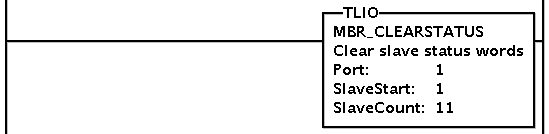
| Parameter | Meaning |
|---|---|
Port: |
The COM port number of interest. |
SlaveStart |
The starting slave id of the first slave of interest within a contiguous range. |
SlaveCount |
The number of contiguous slave ids of interest. In the example rung above, there will be 11 slaves cleared starting at slave 1. |
5.4. Modbus Exception Codes
| Code | Name | Meaning |
|---|---|---|
1 |
ILLEGAL FUNCTION |
The function code received in the query is not an allowable action for the slave. If a Poll Program Complete command was issued, this code indicates that no program function preceded it. |
2 |
ILLEGAL DATA ADDRESS |
The data address received in the query is not an allowable address for the slave. |
3 |
ILLEGAL DATA VALUE |
A value contained in the query data field is not an allowable value for the slave. |
4 |
SLAVE DEVICE FAILURE |
An unrecoverable error occurred while the slave was attempting to perform the requested action. |
5 |
ACKNOWLEDGE |
The slave has accepted the request and is processing it, but a long duration of time will be required to do so. This response is returned to revent a timeout error from occurring in the master. The master can next issue a Poll Program Complete message to determine if processing is completed. |
6 |
SLAVE DEVICE BUSY |
The slave is engaged in processing a long–duration program command. The master should retransmit the message later when the slave is free. |
7 |
NEGATIVE ACKNOWLEDGE |
The slave cannot perform the program function received in the query. This code is returned for an unsuccessful programming request using function code 13 or 14 decimal. The master should request diagnostic or error information from the slave. |
8 |
MEMORY PARITY ERROR |
The slave attempted to read extended memory, but detected a parity error in the memory. The master can retry the request, but service may be required on the slave device. |
5.5. Internal Exception Codes
| Code | Name | Meaning |
|---|---|---|
-1 |
BAD CRC |
The CRC16 of the reply did not match what was expected. |
-2 |
INCOMPLETE REPLY |
There was an inter-character timeout, meaning the slave sent a reply with a gap within it, or the reply was incomplete. |
-3 |
NO REPLY |
There was no reply within the requestTimeout setting. |
-4 |
NO CTS |
The CTS line was not asserted by the modem via the cable within the ModemControl waitDelayCTS setting. |
-5 |
NO XMIT ROOM |
The port’s transmit queue is not emptying fast enough. You must extend your requestTimeouts. |
-6 |
WAIT XMITTED |
The port’s transmit queue is not emptying fast enough. Please report this to support@softplc.com. |
6. Debugging
This section gives tips on debugging problems on the Modbus network.
6.1. Isolating the Problem Slave Node
During startup or when troubleshooting a problem node it is usually best to isolate the problem node. This means look at it in isolation, by making it the only active slave on the network. You can keep the other slaves connected, but use a temporary configuration file to announce to the TLM only the node that you are troubleshooting. All other nodes/slaves will simply not be scanned.
| Before you start debugging, you should use the configuration editor to Fetch and then Save your existing full blown configuration. Then on your development system (Windows computer), temporarily copy the file \SoftPLC\plc\<PLCNAME>\MODBMAST.XML to a safe place. Then you can edit the configuration file temporarily and experiment freely. Later restore by copying from the safe place back to \SoftPLC\plc\<PLCNAME>\MODBMAST.XML. Then use the editor to Load then Send the file back down to SoftPLC. Remember that you have to restart SoftPLC after each configuration change, or you can do a PROGRAM mode to PROGRAM mode transition. |
6.2. Enable Debugging
The SoftPLC runtime engine constantly monitors its processes, and 'logs' these observations as process output. By default, these logs are minimal. However, for troubleshooting purposes, the logs can provide greater detail.
In the configuration file there is the top most element ModbusSerial and its attribute debug.
-
A debug value of "0" represents the minimal detail to be logged.
-
A debug value of "1" increases the detail logged.
-
A debug value of "2" adds timing information to the lower level values.
6.3. View Debugging
Viewing these logs shall be completed at the command prompt of the SoftPLC system. To access the command prompt, log into the SoftPLC by either:
-
(from Windows) use third-party 'PUTTY' application
-
(from Linux) use SSH from Terminal application
-
(TOPDOC 5.x) use Remote Console feature in the 'PLC' window
|
Default login credentials are as follows: user: root password: softplc |
Once logged in, the logs can be viewed by executing one of the following:
(the '#' represents the prompt, and is not typed)
-
For SoftPLC firmware 4.x
-
# logread
-
-
For SoftPLC firmware 5.x
-
# journalctl -u softplc
-
You may need to use the arrow keys to scroll down to the end of the logs. The last logs are the most recent.
-
-
6.4. Direct Debugging to Text File
The previous sections have shown how to view the logs from the command prompt. However, recording the logs to text file format is, in the least, efficient for receiving support. Accomplishing this, much like viewing the logs, is firmware dependent (see following sections). Once the text file is created, it can be transferred via (S)FTP to the TOPDOC machine. A detailed explanation of (S)FTP transfers can be found in the TOPDOC User’s Guide.
6.4.1. Direct Debugging output into a text file (SoftPLC 4.x)
-
Log into SoftPLC using either a) PUTTY from Windows or b) using ssh from Linux or c) at the command prompt of the SoftPLC system.
-
Run this command:
# /etc/init.d/softplc.sh stop -
Change into the /SoftPLC/run directory:
# cd /SoftPLC/run -
You can run SoftPLC from the command prompt now and redirect its output to an arbitrary file (named out.txt here). We put that file into the RAM disk which is anchored in the /tmp directory.
# ./runsplc > /tmp/out.txt -
Let this run for 5-60 seconds, then press control-C. Now you have the output captured in file /tmp/out.txt, each request-response transaction will be captured in that file.
-
You can look at the file using the program named "less".
# less /tmp/out.txt
Press ESC when done. -
You can make configuration file changes and Send them down to SoftPLC. Then merely repeat the part of this process starting at step 4 above.
-
When done, remember to set debug back to "0", then you can start SoftPLC as a daemon either by a) power cycling the box or b) doing the following:
# /etc/init.d/softplc.sh start
6.4.2. Direct Debugging output into a text file (SoftPLC 5.x)
-
Log into SoftPLC using either a) the remote console feature in TOPDOC’s PLC window, b) PUTTY from Windows, or c) using ssh from Linux.
-
Run this command:
# systemctl stop softplc -
Change into the /SoftPLC/run directory:
# cd /SoftPLC/run -
You can run SoftPLC from the command prompt now and redirect its output to an arbitrary file (named out.txt here). We put that file into the RAM disk which is anchored in the /tmp directory.
# ./runsplc > /tmp/out.txt -
Let this run for 5-60 seconds, then press control-C. Now you have the output captured in file /tmp/out.txt, each request-response transaction will be captured in that file.
-
You can look at the file using the program named "less".
# less /tmp/out.txt
Press ESC when done. -
You can make configuration file changes and Send them down to SoftPLC. Then merely repeat the part of this process starting at step 4 above.
-
When done, remember to set debug back to "0", then you can start SoftPLC as a daemon either by a) power cycling the box or b) doing the following:
# systemctl start softplc